How To Freeze Cells Using OpenPyXL?

Method

ws.freeze_panes = ‘B2’

Sample Code

#Freeze the Cells

#Import load_workbook function
from openpyxl import Workbook

#Create a new workbook
wb=Workbook()
#Get the active worksheet
ws=wb.active

#Freeze a cell
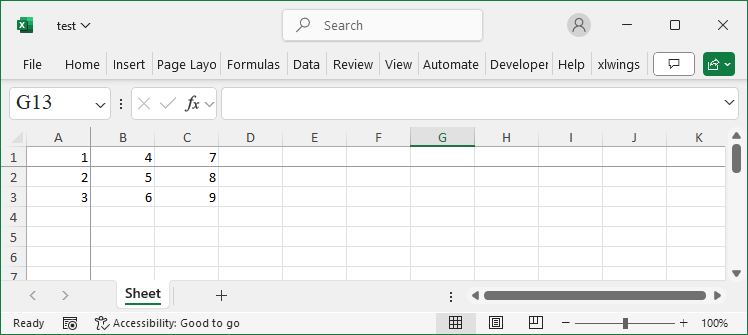
ws.freeze_panes = 'B2'

wb.save('test.xlsx')
wb.close()
Freeze Cells Using OpenPyXL

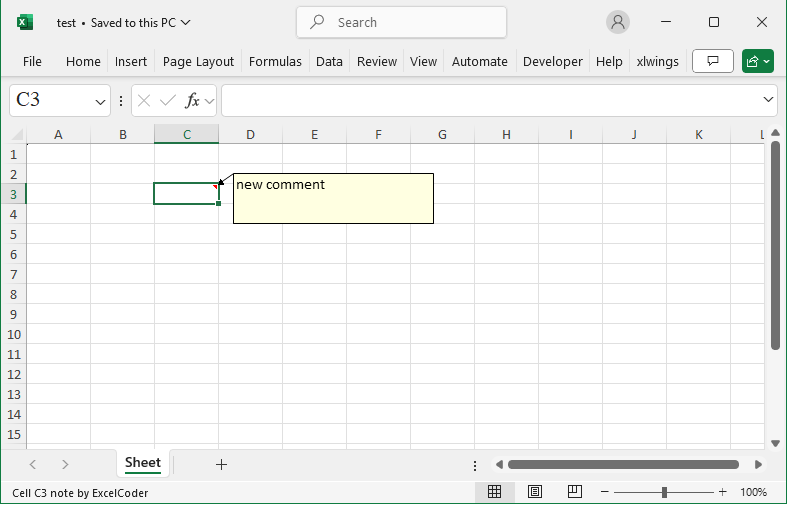
How To Add Comments Using OpenPyXL?

Method

The `comments` object and `comment` object


from openpyxl.comments import Comment

cm=Comment(‘new comment’,’ExcelCoder’)

cm.width=200

cm.height=50

ws[‘C3’].comment=cm

Sample Code

#Adding Comments

#Import load_workbook function
from openpyxl import Workbook

#Create a new workbook
wb=Workbook()
#Get the active worksheet
ws=wb.active

#Import Comment function
from openpyxl.comments import Comment

#Create a Comment object
cm=Comment('new comment','ExcelCoder')
#Set properties for the comment object
cm.width=200
cm.height=50
ws['C3'].comment=cm

wb.save('test.xlsx')
wb.close()
Add Comments Using OpenPyXL

How To Unmerge Cell Ranges Using OpenPyXL?

Method

Use the `unmerge_cells` method to unmerge cells.

ws.unmerge_cells(range_string=None,start_row=None,start_column=None,end_row=None,end_column=None)

Sample Code

# Unmerge Cell Ranges

#Import load_workbook function
from openpyxl import Workbook

#Create a new workbook
wb=Workbook()
#Get the active worksheet
ws=wb.active

#Unmerge a cell range
ws.unmerge_cells('C3:E4')
#ws.unmerge_cells(start_row=3, start_column=3, \
#    end_row=4, end_column=5)

wb.save('test.xlsx')
wb.close()

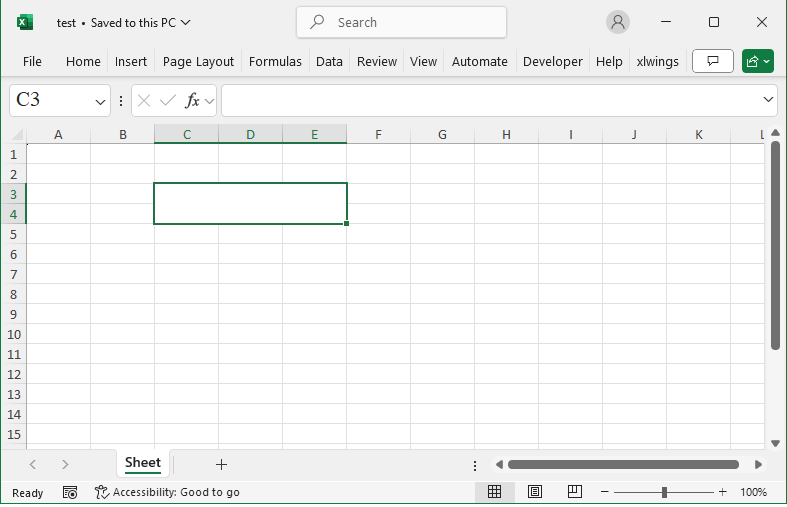
How To Merge Cell Ranges Using OpenPyXL?

Method

Use the `merge_cells` method of the worksheet object to merge cells:

ws.merge_cells(range_string=None,start_row=None,start_column=None,end_row=None,end_column=None)

Sample Code

#Merge Cell Ranges

#Import load_workbook function
from openpyxl import Workbook

#Create a new workbook
wb=Workbook()
#Get the active worksheet
ws=wb.active

#Merge a cell range
ws.merge_cells('C3:E4')
#ws.merge_cells(start_row=3, start_column=3, \
#    end_row=4, end_column=5)

wb.save('test.xlsx')
wb.close()
Merge Cell Ranges Using OpenPyXL

How To Set Operations on Cell Ranges Using OpenPyXL?

Method

Methods of the `CellRange` object:

  • cr.union(other)
  • cr.intersection(other)
  • cr.issubset(other)
  • cr.issuperset(other)
  • cr.isdisjoint(other)

Sample Code

#Set Operations of Cell Ranges

#Import load_workbook function
from openpyxl import Workbook

#Create a new workbook
wb=Workbook()
#Get the active worksheet
ws=wb.active

#Import CellRange function
from openpyxl.worksheet.cell_range import CellRange

#Create two cell range objects
cr1=CellRange('D5:F7')
cr2=CellRange('E3:G5')

#Compute the union of the two ranges
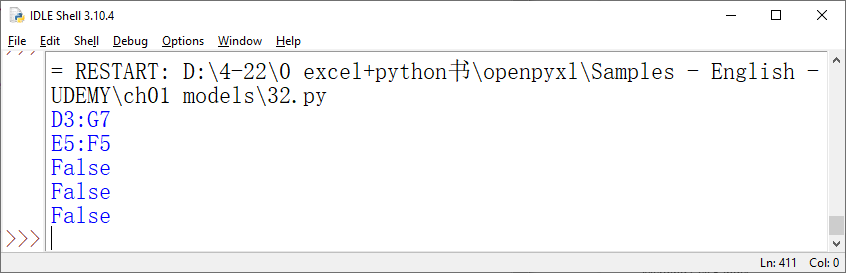
print(cr1.union(cr2))

#Compute the intersection of the two ranges
print(cr1.intersection(cr2))

#Check if one range is a subset of the other
print(cr1.issubset(cr2))

#Check if one range is a superset of the other
print(cr1.issuperset(cr2))

#Check if the two ranges are disconnected
print(cr1.isdisjoint(cr2))

wb.save('test.xlsx')
wb.close()
Set Operations on Cell Ranges Using OpenPyXL

How To Expande and Shrink Specified Regions Using OpenPyXL?

Method

  • Expand using the `expand` method of the `CellRange` object

cr.expand(right=0,down=0,left=0,up=0)

  • using the `shrink` method of the `CellRange` object

cr.shrink(right=0,bottom=0,left=0,top=0)


Use the `size` attribute to view the changes before and after.

Sample Code

#Expanding and Shinking Cell Ranges

#Import load_workbook function
from openpyxl import Workbook

#Create a new workbook
wb=Workbook()
#Get the active worksheet
ws=wb.active

#Import CellRange function
from openpyxl.worksheet.cell_range import CellRange

#Create a cell range object
cr=CellRange('D5:F7')
#Output the size of the cell range
print(cr.size)

#Expanding
cr.expand(right=1,down=2,left=0,up=0)
print(cr.size)
#Shinking
#cr.shrink(right=1,bottom=2,left=0,top=0)
#print(cr.size)

wb.save('test.xlsx')
wb.close()
Expande and Shrink Specified Regions Using OpenPyXL

How To Move Cell Ranges Using OpenPyXL?

Method

Move a range using the `move_range` method of the worksheet object:

ws.move_range(cr,rows,cols)

The first parameter of this method specifies the range to be moved, which must be a CellRange object; the rows parameter defines the vertical movement. If the value is greater than 0, it moves down; if the value is less than 0, it moves up. The cols parameter defines the horizontal movement. If the value is greater than 0, it moves to the right; if the value is less than 0, it moves to the left.

Sample Code

#Move the Cell Range

#Import load_workbook function
from openpyxl import Workbook

#Create a new workbook
wb=Workbook()
#Get the active worksheet
ws=wb.active

#Move the cell range
#Row: >0 moves down; <0 moves up
#Column: >0 moves right; <0 moves left

from openpyxl.styles import PatternFill
ws['D4'].fill=PatternFill(fill_type='solid', start_color='00FF00')
ws['F10'].fill=PatternFill(fill_type='solid', start_color='00FF00')
ws.move_range('D4:F10', rows=-1, cols=2)

wb.save('test.xlsx')
wb.close()
Move Cell Ranges Using OpenPyXL

How To Copy Cell Range Styles Using OpenPyXL?

Method

Copying styles:

from copy import copy

cr=CellRange(‘D5:F7’)

cr2=CellRange(‘D12:F14’)

r=cr2.max_row-cr.max_row

c=cr2.max_col-cr.max_col

for cl in cr.cells:

      cl2=ws.cell(row=cl[0],column=cl[1])

      ws.cell(row=cl[0]+r,column=cl[1]+c,value=cl2.value)

      if cl2.has_style:

            nc=ws.cell(row=cl[0]+r,column=cl[1]+c)

            nc.font=copy(cl2.font)

            nc.border=copy(cl2.border)

            nc.fill=copy(cl2.fill)

            nc.number_format=copy(cl2.number_format)

            nc.alignment=copy(cl2.alignment)

Sample Code

#Copy the Style of a Cell Range

#Import load_workbook function
from openpyxl import Workbook

#Create a new workbook
wb=Workbook()
#Get the active worksheet
ws=wb.active

#Import CellRange class and copy function
from openpyxl.worksheet.cell_range import CellRange
from copy import copy

#Create two cell ranges
cr=CellRange('D5:F7')
cr2=CellRange('D12:F14')

#Copy the style
r=cr2.max_row-cr.max_row
c=cr2.max_col-cr.max_col
for cl in cr.cells:
      cl2=ws.cell(row=cl[0],column=cl[1])
      ws.cell(row=cl[0]+r,column=cl[1]+c,value=cl2.value)
      #If there are styles, use the `copy` function to copy them
      if cl2.has_style:
            nc=ws.cell(row=cl[0]+r,column=cl[1]+c)
            nc.font=copy(cl2.font)
            nc.border=copy(cl2.border)
            nc.fill=copy(cl2.fill)
            nc.number_format=copy(cl2.number_format)
            nc.alignment=copy(cl2.alignment)

wb.save('test.xlsx')
wb.close()

How To Copy Cell Ranges Using OpenPyXL?

Method

Copying content:

from openpyxl.worksheet.cell_range import CellRange

cr=CellRange(‘D5:F7’)

cr2=CellRange(‘D12:F14’)

r=cr2.max_row-cr.max_row

c=cr2.max_col-cr.max_col

for cl in cr.cells:

      cl2=ws.cell(row=cl[0],column=cl[1])

      ws.cell(row=cl[0]+r,column=cl[1]+c,value=cl2.value)

Sample Code

#Copy Cell Ranges

#Import load_workbook function
from openpyxl import Workbook

#Create a new workbook
wb=Workbook()
#Get the active worksheet
ws=wb.active

#Import CellRange class
from openpyxl.worksheet.cell_range import CellRange

#Create a cell range object
cr=CellRange('D5:F7')
cr2=CellRange('D12:F14')

#Copy the values
r=cr2.max_row-cr.max_row
c=cr2.max_col-cr.max_col
for cl in cr.cells:
      cl2=ws.cell(row=cl[0],column=cl[1])
      ws.cell(row=cl[0]+r,column=cl[1]+c,value=cl2.value)

wb.save('test.xlsx')
wb.close()

How To Set Cell Styles Using OpenPyX – Protection

Method

from openpyxl.styles import Protection


#Set protection

ws[‘C3’].protection=Protection(locked=True)

ws[‘C3′]=’abc123’

ws.protection.sheet=True

Sample Code

#Cell Style: Setting Protection

#Import load_workbook function
from openpyxl import Workbook

#Create a new workbook
wb=Workbook()
#Get the active worksheet
ws=wb.active

#Import Protection class
from openpyxl.styles import Protection

#Set protection
ws['C3'].protection=Protection(locked=False)
ws['C3']='abc123'
ws.protection.sheet=True

wb.save('test.xlsx')
wb.close()