How To Traverse Rows/Columns Using OpenPyXL?

Method

Use the `rows` property to iterate over all rows with data, and `columns` to iterate over all columns with data. The `values` property provides access to the data in the sheet’s cell range.

Sample Code

#Iterating through Rows and Columns

#Import load_workbook function
from openpyxl import Workbook

#Create a new workbook
wb=Workbook()
#Get the active worksheet
ws=wb.active

#Iterate through each cell in the first row
for cell in ws['1']:
    print(cell.value)    #Output the value of each cell

#Iterate through each cell in the first column
for cell in ws['A']:
    print(cell.value)    #Output the value of each cell

#Iterate through the first to third rows
for row in ws['1:3']:
    for cell in row:      #Iterate through each row's cells
        print(cell.value)    #Output the value of each cell

#Iterate through the first to third columns
for column in ws['A:C']:
    for cell in column:   #Iterate through each column's cells
        print(cell.value)    #Output the value of each cell

#Iterate through all rows using the rows attribute of the worksheet
for row in ws.rows:
    line=[cell.value for cell in row]
    print (line)

#Iterate through all columns using the columns attribute of the worksheet
for column in ws.columns:
    line = [cell.value for cell in column]
    print (line)

#Use the values attribute to return data from each row, returned as a list
for row in ws.values:
    print(row)

#Output as a list
for row in ws.values:
    print(list(row))

wb.save('test.xlsx')
wb.close()
How To Reference Single or Multiple Rows/Columns Using OpenPyXL?

Method

Reference rows or columns by their index or column letter.


Reference a single row/column

Reference continuous multiple rows/columns

Sample Code

#Accessing Specific Rows and Columns

#Import load_workbook function
from openpyxl import Workbook

#Create a new workbook
wb=Workbook()
#Get the active worksheet
ws=wb.active

#Get the 10th row
row10=ws[10]
#Get the 3rd column
colC=ws['C']

#Get multiple rows
rows1=ws[5:10]
#Get multiple columns
cols1=ws['C:D']

wb.save('test.xlsx')
wb.close()

How To Insert and Delete Rows/Columns Using OpenPyXL?

Method

To insert rows or columns, use the `insert_rows` and `insert_cols` methods.

ws.insert_rows(idx,amount=1)

>>> ws.insert_rows(idx=2,amount=5)

ws.insert_cols(idx,amount=1)

>>> ws.insert_cols(idx=2,amount=2)


To delete rows or columns, use `delete_rows` and `delete_cols` methods.

ws.delete_cols(idx,amount=1)

ws.delete_rows(idx,amount=1)

Sample Code

#Inserting and Deleting Rows and Columns

#Import load_workbook function
from openpyxl import Workbook

#Create a new workbook
wb=Workbook()
#Get the active worksheet
ws=wb.active

#Insert 1 empty row above the 5th row
ws.insert_rows(5)
#Insert 3 empty rows above the 5th row
ws.insert_rows(5,3)

#Insert 1 empty column to the left of the 4th column
ws.insert_cols(4)
#Insert 3 empty columns to the left of the 4th column
ws.insert_cols(4,3)

#Delete the 5th row
ws.delete_rows(5)
#Delete the 4th column
ws.delete_cols(4)

#Delete 3 rows starting from the 5th row
#(including the 5th row)
ws.delete_rows(5,3)
#Delete 3 columns starting from the 4th column
#(including the 4th column)
ws.delete_cols(4,3)

wb.save('test.xlsx')
wb.close()

How To Add Rows In a Worksheet Using OpenPyXL?

Method

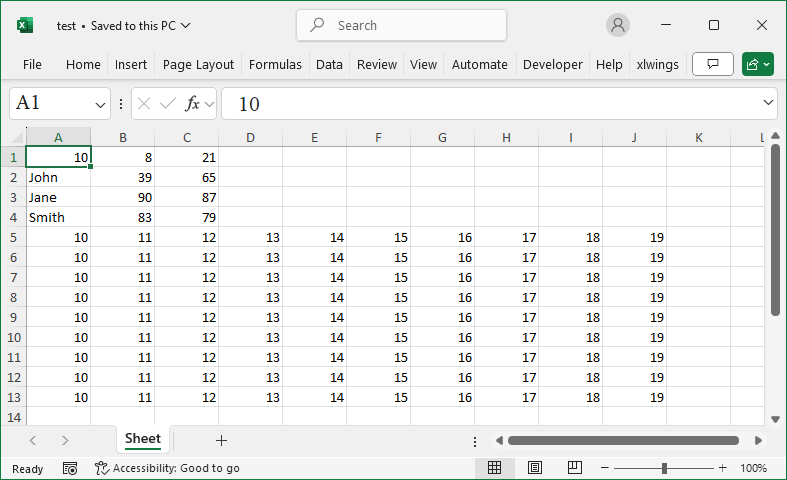
To add a new row of data at the bottom of the current worksheet, use the `append` method:

ws.append(iterable)

Where `iterable` is a list, tuple, dictionary, range, or generator. For a list, the elements are added to the row’s cells in order. If it’s a dictionary, the corresponding keys will add their values.

Sample Code

#Adding Rows

#Import load_workbook function
from openpyxl import Workbook

#Create a new workbook
wb=Workbook()
#Get the active worksheet
ws=wb.active

#Add two rows of list data
ws.append([10, 8, 21])
ws.append(['John', 39, 65])

#Add two rows of dictionary data
ws.append({'A':'Jane', 'B':90, 'C':87})
ws.append({1:'Smith', 2:83, 3:79})

#Use a for loop to continuously add row data
for row in range(1, 10):
    ws.append(range(10,20))

wb.save('test.xlsx')
wb.close()
Add Rows In a Worksheet

How To Copy and Move Worksheets Using OpenPyXL?

Method

To copy a worksheet, use the `copy_worksheet` method:

>>> copy_sheet=wb.copy_worksheet(ws)

To move a worksheet (cut and paste), use the `move_sheet` method:

>>> wb.move_sheet(ws, offset=1)

The `offset` parameter specifies the number of positions to move the worksheet. If the value is greater than 0, the source sheet moves to the right by the specified number; if it’s less than 0, it moves to the left.

Sample Code

#Copying and Moving Worksheets

#Import load_workbook function
from openpyxl import Workbook

#Create a new workbook
wb=Workbook()
#Get the active worksheet
ws=wb.active

#Copy worksheets
copy_sheet1=wb.copy_worksheet(ws)
copy_sheet2=wb.copy_worksheet(ws)
#Specify the title of the first copied worksheet
copy_sheet1.title='NewSheet'

#Move worksheets
#If the offset value n > 0, move n columns to the right;
#n < 0, move n columns to the left
wb.move_sheet(ws, offset=1)

wb.save('test.xlsx')
wb.close()

How To Reference Worksheets Using OpenPyXL?

Method

sheets=wb.worksheets

ws=sheets[0]     #Using sheet index

ws2=wb[Sheet]    #Using sheet name

ws3=wb.get_sheet_by_name(Sheet)


names=wb.sheetnames

ws4=wb[names[0]]

Sample Code

#Accessing Worksheets by Index or Name

#Import load_workbook function
from openpyxl import load_workbook

#Load the workbook
wb=load_workbook(filename='wb2.xlsx')
#Get the worksheet collection object
sheets=wb.worksheets
#Access the first worksheet using the index
ws=sheets[0]
#Output the title of the worksheet
print(ws.title)

#Access the worksheet by name
ws2=wb['Sheet']
#Output the title of worksheet ws2
print(ws2.title)

#Use get_sheet_by_name function to access a specified worksheet
ws3=wb.get_sheet_by_name('Sheet')
#Output the title of worksheet ws3
print(ws3.title)

#Get all worksheet names
names=wb.sheetnames
#Access the corresponding worksheet by the first name
ws4=wb[names[0]]
#Output the title of worksheet ws4
print(ws4.title)

wb.save('test.xlsx')
wb.close()

How To Store and Manage Worksheets Using OpenPyXL?

Method

Newly created worksheet objects are automatically added to the `worksheets` collection. You can extract objects from this collection using indexing or iteration, and also remove objects from it.

To access the `worksheets` collection of a workbook object:

>>> sheets=wb.worksheets

>>> sheets[0].title

‘Sheet’

>>> sheets[1].title

‘MySheet’


Accessing the active worksheet:

>>> ws=wb.active

If you don’t know the worksheet name but know the index, use the `sheetnames` property to get all sheet names and reference the sheet by index:

>>> names = wb.sheetnames

>>> ws4 = wb[names[0]]


To remove a worksheet from the collection:

>>> wb.remove(ws)

Check how many objects are in the collection:

>>> sheets=wb.worksheets

>>> len(sheets)

Sample Code

#Managing and Storing Worksheets

#Import load_workbook function
from openpyxl import load_workbook

#Load the workbook
wb=load_workbook(filename='wb2.xlsx')
#Create a new worksheet
ws1=wb.create_sheet()
#Get the worksheet collection object
sheets=wb.worksheets
#Output the title of the first worksheet
print(sheets[0].title)
#Output the title of the second worksheet
print(sheets[1].title)

#Output the worksheet collection
print(sheets)
#Output the number of worksheets in the collection
print(len(sheets))

#Iterate through the workbook and
#output the titles of each worksheet
for sheet in wb:
    print(sheet.title)

#Delete the newly created worksheets
wb.remove(ws1)
#Re-fetch the number of worksheets
#in the collection and output it
sheets=wb.worksheets
print(len(sheets))

wb.save('test.xlsx')
wb.close()

How To Create and Delete Worksheets Using OpenPyXL?

Method

To create a new worksheet, use the `create_sheet` method of the workbook object. Its syntax is:

ws=wb.create_sheet(title=None, index=None)

Where `title` is a string representing the name of the new worksheet, and `index` is an integer representing the position at which to insert the worksheet. Both parameters are optional. The method returns a worksheet object, which automatically becomes the active worksheet.

Common attributes:

  • active_cell
  • selected_cell
  • rows
  • columns
  • dimensions
  • max_column    #the highest column with data, 1-based index
  • max_row
  • min_column
  • min_row
  • merged_cell_ranges
  • show_gridlines
  • title
  • Values

To delete a specific worksheet, use the `remove` method of the workbook object. For example, to delete the `ws1` worksheet:

wb.remove(ws1)

Sample Code

#Create and Delete Worksheets

#Import load_workbook function
from openpyxl import load_workbook

#Load the workbook
wb=load_workbook(filename='wb2.xlsx')
#Get the active worksheet
ws=wb.active
#Output the title of the active worksheet
print(ws.title)

#Create a new worksheet with the default name
ws1=wb.create_sheet()
#Create a new worksheet named `Mysheet2`
ws2=wb.create_sheet('Mysheet2')
#Create a new worksheet named `Mysheet3`,
#placing it at the front
ws3=wb.create_sheet('Mysheet3', 0)
#Create a new worksheet named `Mysheet4`,
#placing it second to last
ws4=wb.create_sheet('Mysheet4', -1)

#Delete worksheet `ws4`
wb.remove(ws4)
#Delete worksheet `ws3`
del wb[ws3.title]

#Save the workbook
wb.save('test.xlsx')

#Close the workbook
wb.close()

How To Open .xls Files Using OpenPyXL?

Method

  • Open with Excel and save as .xlsx file.
  • Import with pandas and write to a .xlsx file.
  • Open with win32com or xlwings and save as .xlsx file.

Sample Code

#Use pandas

#
from openpyxl import load_workbook
workbook = load_workbook(filename="d:/wb2.xlsx")
sheet = workbook.active
sheet.freeze_panes = 'B2'
workbook.save('d:/wb2.xlsx')

How To Open an Existing Workbook File Using OpenPyXL?

Method

The `load_workbook` function can be used to open an existing workbook file. The function’s syntax is:

wb=openpyxl.load_workbook(filename,read_only,keep_vba,guess_types, data_only,keep_links)

Where:

`filename` — a string representing the file path and name of the file to be opened.

`read_only` — a boolean indicating read-only mode. Setting it to read-only helps save memory for large files.

`keep_vba` — a boolean for files with VBA macros. If True, it retains the VBA code.

`guess_types` — a boolean that determines whether to guess data types when reading data from the worksheet.

`data_only` — a boolean specifying whether to display the most recent calculation results in cells containing formulas.

`keep_links` — a boolean indicating whether to preserve external links.

This function returns a workbook object.

Sample Code

#Opening an Existing Workbook

#Import the load_workbook function
from openpyxl import load_workbook

#Load an existing workbook file
wb=load_workbook('test.xlsx')