Method
To add a new row of data at the bottom of the current worksheet, use the `append` method:
ws.append(iterable)
Where `iterable` is a list, tuple, dictionary, range, or generator. For a list, the elements are added to the row’s cells in order. If it’s a dictionary, the corresponding keys will add their values.
Sample Code
#Adding Rows

#Import load_workbook function
from openpyxl import Workbook

#Create a new workbook
wb=Workbook()
#Get the active worksheet
ws=wb.active

#Add two rows of list data
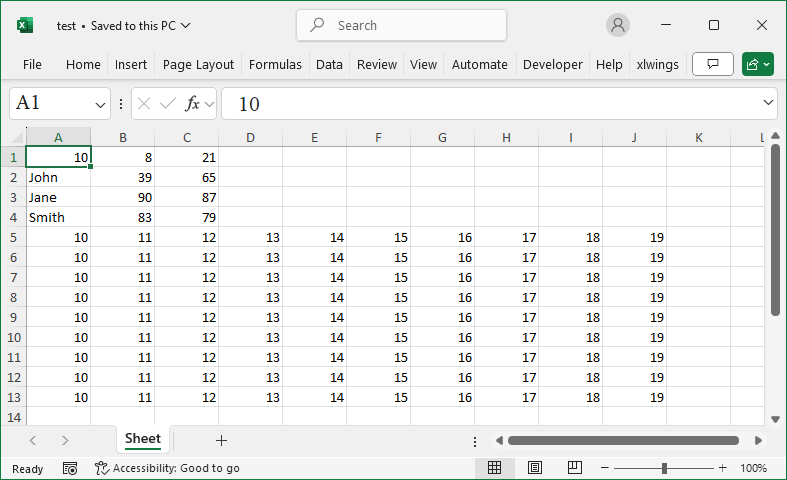
ws.append([10, 8, 21])
ws.append(['John', 39, 65])

#Add two rows of dictionary data
ws.append({'A':'Jane', 'B':90, 'C':87})
ws.append({1:'Smith', 2:83, 3:79})

#Use a for loop to continuously add row data
for row in range(1, 10):
    ws.append(range(10,20))

wb.save('test.xlsx')
wb.close()